SwetaxAI: PhysicsForge

PhysicsForge is SwetaxAI's interactive physics playground — where curiosity meets computation. Designed for students, educators, and science enthusiasts, this page transforms abstract physics concepts into hands-on, AI-powered simulations you can see, tweak, and truly feel.
SWETAXAI: Interactive Physics Learning Modules

Explore the Science of Magnetism — Interactive Grade 8 Module
Dive into the invisible forces that shape our world.
This fully interactive Magnetism module covers magnetic poles, field lines, electromagnetism, and real-world applications, built for Grade 8 learners.
Simulate bar magnets, test attraction and repulsion, and challenge yourself with an instant-feedback quiz. No downloads, no sign-ups, just pure, engaging science.
Why Do Things Float or Sink? Discover the Science of Density & Buoyancy
Every ship that sails, every submarine that dives, every balloon that rises — all obey the same invisible laws of density and buoyancy. But most students only ever read about them.
This interactive module puts the science in your hands. Adjust mass, change volume, swap fluids, and watch in real time as objects float or sink — with live force calculations driving every frame. Explore Archimedes' Principle through a virtual tank experiment, discover how fish control depth using a swim bladder, and find out why 92% of an iceberg hides beneath the surface.
Whether you're a curious learner or a student preparing for exams, this module transforms abstract formulas into visual, hands-on understanding — no textbook required.
- Interactive float/sink simulator with real-time physics
- Archimedes' tank experiment with displacement visualization
- 8 real-world applications from ships to the Dead Sea
- 8-question knowledge quiz with instant explanations
Bring Science to Life — One Wave at a Time
Interactive Science Modules Explore physics and chemistry through hands-on simulations, live calculators, and instant quizzes — designed for Class 6 and beyond.
Bring Science to Life — One Wave at a Time
Explore the world of waves through hands-on simulations, animated diagrams, and instant quizzes — all designed for Class 6 learners.
From transverse to longitudinal, understand every concept visually and interactively, powered by SwetaxAI.
Learn Physics by Doing, Not Just Reading
Explore Newton's Three Laws of Motion through hands-on interactive simulations, no textbook required.
Drag sliders, launch objects, and watch physics happen in real time. SwetaxAI's Newton's Laws module breaks down inertia, force & acceleration, and action-reaction through visual, interactive experiments designed for curious minds of all ages.
Light Basics Interactive Guide
Light breaks the rules. It behaves as a wave — bending, interfering, spreading through space. It also behaves as a stream of discrete particles called photons. The strange truth? It's both, and the experiment you run decides which nature you see.
This paradox isn't a gap in our knowledge. It's the foundation of quantum mechanics — and the bedrock of every semiconductor, laser, and solar cell ever built.
Sound Basics Interactive Module
It covers four core topics, each with live audio and visuals:
- Waveforms — Switch between Sine, Square, Sawtooth, and Triangle waves. Adjust frequency & amplitude, and toggle playback to hear the difference.
- Frequency & Pitch — A piano keyboard (C4–C5) you can click to hear notes. The wave visualization shifts color and density as pitch changes.
- Properties — Tap each card (Frequency, Amplitude, Timbre, Speed) to see an animated canvas diagram and explanation.
- Decibels — Click real-world examples (whisper → thunderclap) to animate the dB meter and hear a tone scaled to that loudness level.
Electricity Basics Interactive Learning Module
Here's your Electricity Basics interactive learning module. It features:
- Concepts — Clear explanations of Voltage, Current, Resistance, Power, and Ohm's Law with formula displays
- Ohm's Law Calc — Enter any 2 of 3 values (V, I, R) to solve for the third; plus a Power calculator
- Circuit Sim — Drag sliders to adjust voltage & resistance and watch animated electrons flow faster/slower, with a glowing bulb that brightens with more current
Explore the Physics of Simple Machines
Here's your Interactive Simple Machines Simulator
What's included:
- 🔩 Lever — Adjust effort/load forces and arm lengths; see balance in real time
- ⚙️ Pulley — Toggle between single and compound systems
- 📐 Inclined Plane — Control angle and friction coefficient
- 🎡 Wheel & Axle — Animated spinning wheel with radius controls
- 🔺 Wedge — Visualize splitting force vectors
- 🔧 Screw — Helical thread drawing with pitch & radius controls
Every machine shows live physics calculations, a mechanical advantage meter, real-world examples, and the governing formula , all updating instantly as you drag the sliders.
Interactive Forces Simulator
Here's your Interactive Forces Simulator!
What's included:
- 4 toggleable forces — each with a real physics formula:
- ⬇ Gravity (F = mg) — pulls balls downward
- 💨 Wind — constant horizontal push (with animated arrows)
- 🔥 Friction (v × μ) — slows motion via velocity damping
- ⚡ Repulsion (F ∝ 1/r²) — balls push each other apart
- Intensity sliders for each active force
- Click & drag on the canvas to attract all nearby balls
- Motion trails toggle for visual flair
- Add Ball and Reset controls
- Speed vectors shown as arrows on each ball
SWETAXAI: MODERN PHYSICS LEARNING MODULES
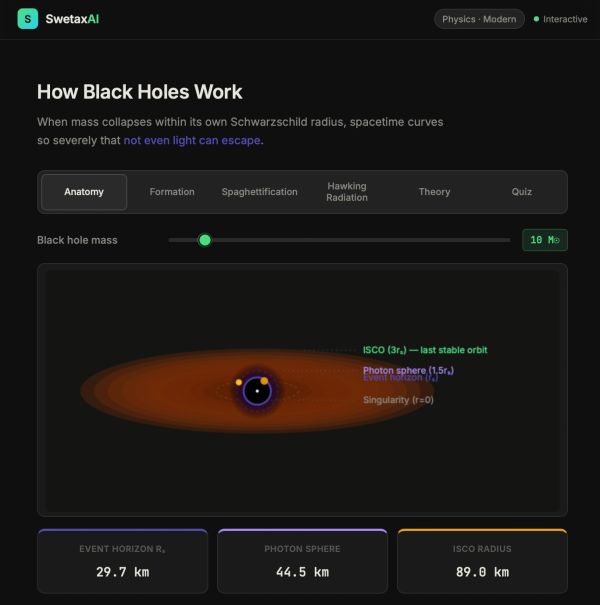
The Point of No Return. Explore Every Layer of a Black Hole Live.
Black holes are the most extreme objects in the universe — and this interactive module takes you inside them layer by layer. Start with the Anatomy tab: drag the mass slider and watch the event horizon, photon sphere, and ISCO all scale in real time on a fully animated cross-section.
Switch to Formation and see three different origins — stellar collapse, neutron star merger, and primordial Big Bang fluctuations — all animated. On the Spaghettification tab, drag an observer toward the singularity and watch tidal forces stretch and compress them along the 1/r³ gradient.
Finally, explore Hawking Radiation: virtual particle pairs pop into existence near the horizon, one escapes, one falls in — and the temperature bar shows just how impossibly cold a stellar-mass black hole really is.
Includes a complete Theory section with the no-hair theorem, four types of black holes, and a NEET/JEE numerical formula reference — plus a 5-question Quiz.
Built for students of Modern Physics, General Relativity, and anyone who has ever wondered what lies beyond the event horizon.
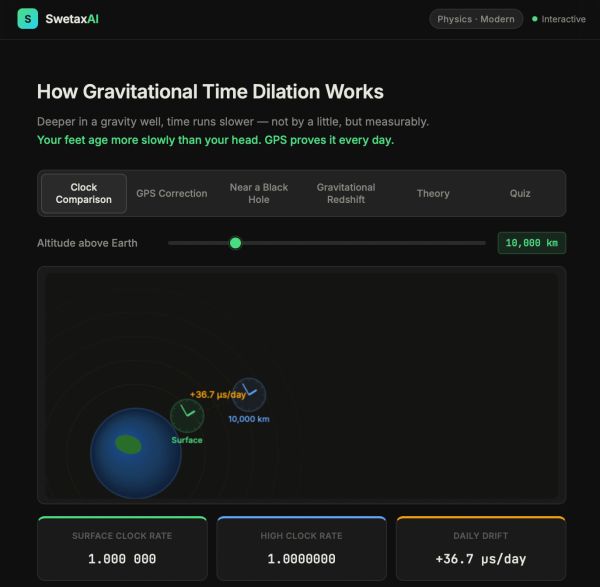
The Clock at Your Feet Runs Slower Than the Clock at Your Head. Physics Proves It.
Gravitational time dilation is one of the most startling predictions of General Relativity — and one of the most thoroughly confirmed. Every GPS satellite in orbit right now carries a clock correction built in, because without it the entire system would fail within hours.
This deep-dive interactive module makes the physics completely tangible: on the Clock Comparison tab, drag the altitude slider and watch two animated analog clocks diverge in real time as the daily drift updates live.
The GPS Correction tab breaks down exactly how −7.2 μs/day from Special Relativity and +45.9 μs/day from General Relativity combine into the +38.4 μs/day correction applied to every GPS satellite before launch.
On the Near a Black Hole tab, drag an observer toward the event horizon and watch their clock slow toward zero relative to a distant observer. The Gravitational Redshift tab shows the Pound-Rebka effect live — light climbing out of a gravity well shifts toward red, with wavelength and redshift z updating as you move the slider.
Includes a complete Theory section with the Schwarzschild time dilation formula, the Pound-Rebka experiment, a reference table from GPS altitude to black hole event horizon, and why the infalling observer feels nothing special at the horizon — plus a 5-question Quiz with numerical problems.
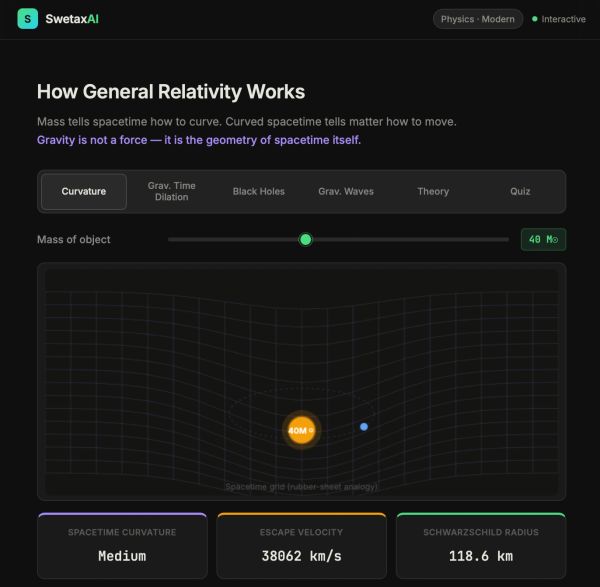
Gravity Isn't a Force. It's the Shape of Space and Time.
Einstein's General Relativity is the most beautiful — and most tested — theory in all of physics. This interactive module takes you through every layer: drag the mass slider on the Curvature tab and watch the spacetime grid warp in real time as a test particle traces its orbit through the curved geometry.
Adjust altitude on the Gravitational Time Dilation tab to see two animated clocks diverge — and understand exactly why GPS satellites need a +38.4 μs/day correction to work. Watch a black hole's event horizon, photon sphere, and accreting matter animate live, then see two black holes spiral together and emit gravitational wave rings outward at the speed of light.
Includes a complete Theory section with Einstein's field equations, the equivalence principle, the Schwarzschild radius formula, and a Newtonian vs GR comparison table — plus a 5-question Quiz with numerical problems.
Built for students of Modern Physics and anyone who wants to truly understand why time passes slower at sea level than on a mountaintop.

1 Gram of Matter. 9 × 10¹³ Joules. That's What E = mc² Actually Means.
E = mc² is the most famous equation in physics — and the most misunderstood. It doesn't just describe nuclear bombs. It explains why the Sun shines, why nuclear reactors work, why matter and antimatter annihilate each other completely, and why nothing with mass can ever reach the speed of light.
This interactive module takes you through every layer: drag the mass slider on the Rest Energy tab and watch the energy equivalent update live in Joules and TNT. Plot the full relativistic energy curve on the Relativistic Mass tab and see where classical physics breaks down. Convert any mass to energy and compare it against coal and TNT. Then explore four nuclear applications — fission, fusion, annihilation, and the Sun — all animated in real time.
Includes a complete Theory section with the energy-momentum relation, mass defect formula, and photon energy — plus a 5-question Quiz with numerical problems.
Built for students of Special Relativity and Modern Physics.

Move Fast Enough and the Universe Physically Shrinks in Front of You.
Length contraction is one of the strangest — and most misunderstood, consequences of special relativity. A moving object isn't squashed by a force.
Space itself contracts along the direction of motion, and the effect is completely real and measurable.
This interactive module makes it tangible: watch a spaceship compress from both frames simultaneously on the Spaceship tab, see a 1-metre ruler shrink with precise measurements on the Ruler tab, and work through the famous Ladder Paradox — where a ladder longer than a garage fits inside, and both frames are simultaneously correct.
Includes a complete Theory section with the Lorentz transformation derivation, proper length explained, a full L vs v reference table, and the relativity of simultaneity resolution — plus a 5-question Quiz with numerical problems.
Built for students studying Special Relativity and Modern Physics.

Your Clock is Running Slow Right Now. You Just Can't Feel It.
Time dilation isn't an approximation or a thought experiment — it's measured every day, in GPS satellites, particle accelerators, and atomic clocks on aeroplanes.
This deep-dive interactive module explains exactly why it happens from first principles: watch the light clock animation show how a moving clock's light pulse takes a longer path, making every tick genuinely slower. Explore the full Lorentz factor curve, solve the twin paradox step by step, and see three real-world experiments that proved time dilation beyond any doubt — GPS corrections, muon survival, and the 1971 Hafele-Keating flight experiment.
Includes a complete Theory section with the γ reference table, proper time explained clearly, and why the effect is real — not an illusion — plus a 5-question Quiz with numerical problems.

The Faster You Move, The Slower Time Runs. Einstein Was Right — See It Live.
Special relativity isn't just a theory — it's the reason GPS works, why muons reach the Earth's surface, and why E = mc² powers every nuclear reactor on the planet.
This interactive module makes it tangible: drag the speed slider toward c and watch two animated clocks diverge in real time on the Time Dilation tab. See a spaceship compress along its direction of motion on Length Contraction. Plot the relativistic energy curve rising toward infinity as speed approaches c on E = mc². Then explore the Spacetime diagram to see how moving frames literally rotate through space and time.
Includes a complete Theory section with Einstein's two postulates, a Classical vs Relativistic comparison table, the twin paradox, and velocity addition — plus a 5-question Quiz with numerical problems. Built for Class 12 Physics and Modern Physics enthusiasts.

Alpha Stopped by Paper. Beta by Aluminium. Gamma Needs Lead. Here's Why.
Three types of nuclear radiation — three completely different particles, penetrations, charges, and dangers.
This interactive module puts them all side by side: select alpha, beta, or gamma and watch the animated decay in real time with the emitted particle flying out of the parent nucleus. Switch to the Penetration tab and see all three beams simultaneously stopped by different barriers. In the Deflection tab, watch alpha bend toward the negative plate, beta bend sharply toward the positive plate, and gamma pass straight through — all animated live in an electric field. Includes a complete Theory section with the full comparison table (10 properties × 3 radiation types), decay equations, and key points — plus a 5-question Quiz.
Built for Class 12 NEET & JEE aspirants studying Nuclei and Nuclear Physics.

Every Dead Thing Carries a Clock. Carbon-14 Lets Us Read It
Carbon dating is one of the most elegant applications of nuclear physics — and this interactive module makes it completely tangible. Use the Age Calculator to input any ¹⁴C percentage and instantly get the age, half-lives elapsed, and decay constant.
Explore 8 real-world artefacts — from the Shroud of Turin to Ötzi the Iceman to Lascaux cave art — plotted live on the decay curve. Watch the full process animated step by step: cosmic rays striking nitrogen, living organisms absorbing ¹⁴C, and the clock starting at death. Includes a complete Theory section with the dating formula, limitations, and a comparison of all major radiometric methods — plus a 5-question Quiz with numerical problems.
Built for Class 12 NEET & JEE aspirants studying Nuclei and Nuclear Physics.

The Power That Lights Every Star — Experience Nuclear Fusion Live
Nuclear fusion is the most powerful energy source in the universe — and humanity is racing to harness it.
This interactive module takes you through every layer: collide deuterium and tritium nuclei and watch 17.6 MeV burst out in real time, explore the binding energy curve to understand why iron-56 is the most stable nucleus ever, see the Sun's pp chain and CNO cycle animated live, and simulate a tokamak reactor by adjusting plasma temperature and magnetic field to reach ignition.
Includes a complete Theory section covering the Coulomb barrier, D-T fusion equation, fusion vs fission comparison table, and the Lawson criterion — plus a 5-question Quiz.
Built for Class 12 NEET & JEE aspirants studying Nuclei and Nuclear Physics.

One Neutron. 200 MeV. A Chain Reaction That Changed the World
Nuclear fission is the most powerful energy source humanity has ever harnessed — and it all starts with a single slow neutron hitting a uranium nucleus.
This interactive module takes you through every layer: fire a neutron and watch ²³⁵U split into Kr + Ba with an animated energy burst, then step through a chain reaction generation by generation and see exactly what k < 1, k = 1, and k > 1 look like in real time. Switch to the Reactor simulator and balance control rods and coolant flow to keep the core stable — or watch it go critical. Includes a complete Theory section with the fission equation, mass-energy equivalence, criticality table, and reactor component breakdown — plus a 5-question Quiz.
Built for Class 12 NEET & JEE aspirants studying Nuclei and Nuclear Physics.

Half the Atoms Gone. Then Half Again. Watch Exponential Decay Happen Live.
Half-life isn't just a formula — it's one of the most elegant laws in all of physics.
This interactive module lets you feel it: drag the sliders to reshape the decay curve in real time, step through an atom grid and watch individual nuclei decay by pure chance, and use the Carbon Dating calculator to find the age of real artefacts from the Shroud of Turin to Lascaux cave art. Includes a Theory section covering the decay law, mean life, activity, and a full isotope reference table — plus a 5-question Quiz with numerical problems.
Built for Class 12 aspirants who need the concept to click, not just be memorised.

Alpha, Beta, Gamma — See Every Type of Radioactive Decay in Real Time
Radioactive decay is one of the most important and most misunderstood, concepts in nuclear physics.
This interactive module breaks it down completely: watch animated alpha, beta, and gamma decay with live particle emission and penetration barriers, then switch to the Half-Life simulator to drag the sliders and see the exponential decay curve rebuild instantly. A complete Theory section covers all three decay equations, the full comparison table, and the decay law plus a 5-question Quiz to lock in your understanding before the exam.
Built for Class 12 NEET & JEE aspirants studying Nuclei and Nuclear Physics.

Every Colour of Light Tells a Story — Explore Atomic Emission Spectra Live
Every element in the universe has a unique spectral fingerprint — a set of precise wavelengths of light it emits when its electrons jump between energy levels.
This interactive module lets you explore exactly how it works: select Hydrogen, Helium, Sodium, or Mercury, choose an electron transition, and watch the Bohr model animate in real time as a photon shoots out. Switch to the Spectra tab to see realistic emission line patterns and compare all four elements side by side. Includes a complete Theory section with the Rydberg formula, spectral series table, and energy level breakdowns — plus a 5-question Quiz.
Built for Class 12 NEET & JEE aspirants studying Atoms and Nuclei.

Two Particles. One Measurement. Instant Correlation — Across Any Distance.
Quantum entanglement is the strangest — and most powerful — phenomenon in modern physics. In this interactive module, measure one particle and watch its entangled partner collapse instantly, no matter how far apart they are.
Explore the singlet state, verify anti-correlation across every trial, and understand why this doesn't allow faster-than-light communication. Includes a complete Theory section covering Bell's theorem, the EPR paradox, and real-world applications — plus a 5-question Quiz to test your understanding.
Built for Class 12 NEET & JEE aspirants studying Modern Physics.

Is the Cat Alive or Dead? — Only Quantum Mechanics Knows
Schrödinger's Cat is the most famous thought experiment in physics — and one of the most misunderstood.
This interactive module walks you through all five stages of the paradox: the sealed box, quantum superposition, wavefunction collapse, and the three interpretations physicists still debate today. Includes an animated simulation, a complete theory breakdown covering Copenhagen, Many Worlds, and Decoherence — plus a 5-question quiz to test your understanding.
Built for Class 12 NEET & JEE aspirants who want concepts that actually stick..
Visualize the Photoelectric Effect — Live & Interactive
Explore Einstein's groundbreaking quantum model with this fully interactive Photoelectric Effect simulator. Visualize how photon frequency and intensity affect electron emission from a metal surface in real time.
Adjust the sliders to see electrons eject — or fail to — and instantly understand why classical wave theory falls short. Complete with live energy calculations, animated particle physics, and curriculum-aligned explanations.
Perfect for NEET 2026 & JEE aspirants

See How an Electron Becomes a Wave — and a Particle
Explore one of the most mind-bending experiments in physics — the Double-Slit Experiment.
Watch in real time as electrons fired one at a time create an interference pattern when unobserved, then instantly collapse into two definite bands the moment a detector watches which slit they pass through.
Built for Class 12 NEET & JEE aspirants, this interactive simulation makes wave-particle duality click in seconds — no textbook required.

Watch Particles Phase Through Walls — Quantum Tunnelling Explained
In the quantum world, particles don't need enough energy to climb over a barrier — they can tunnel straight through it.
This interactive simulator lets you control barrier height and width in real time, watching the wavefunction decay inside the barrier and leak out the other side. See tunnelled particles (teal) pass clean through while reflected ones (blue) bounce back — with live probability calculations updated as you explore.
Built for Class 12 NEET & JEE aspirants who want the concept to click, not just be memorised.

Feel the rhythm — periodic motion, visualized live
Two oscillators. One concept. Watch a pendulum and a spring-mass system move in perfect sync while displacement, velocity, and acceleration graphs plot themselves live — all from a single interactive simulation.
This is SHM (Simple Harmonic Motion) the way your textbook never showed you.
Perfect for NEET 2026 and Class 11 Physics prep.
What's covered:
→ Pendulum vs spring-mass oscillator — side by side
→ Live x(t), v(t), a(t) waveforms
→ How amplitude and frequency change the motion
→ Why velocity peaks at center, drops to zero at extremes

Motion on a Line — See the Physics, Not Just the Formula
Watch a car accelerate, decelerate, and reverse — all on a straight line — while the displacement and velocity graphs build live. Set your own initial velocity and acceleration, hit play, and see exactly how the equations of motion look in real life.
Perfect for Class 11 Physics and NEET 2026 prep.
What you'll see:
→ Uniform velocity vs acceleration vs retardation
→ Live displacement–time and velocity–time graphs
→ Car flipping direction when velocity goes negative
SWETAXAI: THE ARENA (Physics Playground)
Gravity Drop — Universe Edition
What if you could drop a ball on Jupiter, the Moon, or even a Black Hole?
Explore how gravity works across 15 celestial bodies in real time. Watch objects fall faster on massive planets and drift slowly on tiny moons — powered by real physics formulas, guided by Swetron, your AI science mentor.
Perfect for: Students, curious minds & science lovers
Pendulum Pulse — Simple Harmonic Motion
What makes a pendulum tick faster — its weight, its length, or the planet it's on?
Adjust string length, gravity, and damping to see how a pendulum's period changes in real time. Watch the live SHM wave trace as the bob swings, switch between 6 planets, and activate Compare Mode to see three pendulums swing side-by-side. Every change is explained by Swetron, your Science AI Mentor.
Perfect for: Students exploring waves, oscillations & SHM
Collision Lab — Conservation of Momentum
What really happens when two objects crash — and where does the energy go?
Set the mass and velocity of two objects, choose elastic or inelastic collision, and watch momentum conservation play out in real time. Adjust the coefficient of restitution from 0 to 1, run 6 preset scenarios from Newton's Cradle to car crashes, and track every collision in the live momentum chart and log. Guided by Swetron, your Science AI Mentor.
Perfect for: Students learning Newton's laws & momentum

Wave Rider — Sound & Light Interference
"What happens when two waves collide — do they crash, or do they dance?"
Switch between Sound, Light, and 2-Source Interference modes. Adjust frequency, amplitude, and phase to build constructive or destructive patterns. Watch the live superposition wave and interference field update in real time, guided by Swetron.
Perfect for: Students exploring waves, optics & sound, grades 9–12
The LAB
Resistance & Figure of Merit of a Galvanometer
Perform the half deflection method virtually — connect the circuit, observe full deflection θ with series resistance R, then introduce shunt S until the pointer drops to θ/2.
Compute galvanometer resistance G = RS/(R−S) and figure of merit k in real time. Covers the complete CBSE Class XII practical and JEE theory
Explore Wire Resistance module
Explore how wire length, diameter, and material affect electrical resistance, with live calculations, an animated circuit simulator, and real-time oscilloscope. Built for students, educators, and curious minds.
Explore Young's Modulus — Interactively
Explore the elastic properties of metallic wires through a fully interactive virtual experiment. Adjust wire material, dimensions, and applied load, then observe real-time stress, strain, and extension with accurate physics calculations.

Interactive Metre Scale Experiment
Explore the Principle of Moments through an interactive metre scale simulation. Hang known and unknown masses, adjust distances, and watch the beam respond in real time — then let the physics reveal the answer.
Simple Pendulum — Energy Dissipation Module
Explore the fascinating world of damped oscillations with our interactive Simple Pendulum simulator. Watch in real time as mechanical energy decays exponentially — visualized through the square of amplitude A²(t) plotted against time.
Adjust pendulum length, damping coefficient, initial amplitude, and duration to see how each parameter shapes the curve. Powered by real physics equations, this module makes abstract concepts tangible and intuitive for students, educators, and curious minds alike.
Screw Gauge Simulator
Master the screw gauge with our fully interactive, browser-based simulator. Rotate the thimble, place a wire or thin sheet between the jaws, and read the measurement in real time — just like a real lab, but accessible from anywhere.
Perfect for Class 11 & 12 students, competitive exam preparation (JEE / NEET), and practical revision before viva.
Master Precision Measurement with AI-Powered Lab Simulations
Understanding a Vernier Caliper shouldn't stop at a diagram in a textbook. With SwetaxAI's Interactive Science Lab, students can simulate real measurement techniques, external diameter, internal diameter, and depth — directly in their browser. The tool shows live scale readings, highlights the coinciding vernier division, and walks you through every step of the calculation with the correct formula.
Built for students, teachers, and curious minds, this lab makes precision measurement visual, accurate, and genuinely easy to understand.
Explore the Science of Surface Tension
Dive into one of chemistry's most elegant phenomena with our fully interactive Surface Tension Explorer. Manipulate tube radius, contact angle, fluid density, and surface tension in real time to watch Jurin's Law come alive through animated capillary rise and depression.
Switch to the Detergent Effect lab to see how surfactant molecules crowd the air–water interface, observe micelle formation above the CMC, and track how household soap slashes water's surface tension from 72.8 mN/m down to ~30 mN/m.
Backed by molecular-level animation — this is physical chemistry the way it should be taught.
Coefficient of Viscosity
Dive into real-world physics experiments — no lab coat required. Our AI-powered simulation lets you measure the Coefficient of Viscosity of liquids using Stokes' Law and the Terminal Velocity method, exactly as you would in a university lab. Adjust sphere size, density, and liquid medium in real time, watch the physics unfold visually, and record your observations in a structured data table — all inside your browser.
Whether you're a student preparing for board exams or a curious learner, SwetaxAI's Physics Lab brings the precision of a real experiment to your screen.

Speed of Sound — Resonance Tube Simulation
Investigate how sound travels through air using a virtual resonance tube experiment. Adjust tuning fork frequency, resonance positions, and temperature in real time — and watch standing wave patterns animate live as you measure.
Built with accurate physics, end correction, and instant error analysis against theoretical values.

Specific Heat Capacity - Method of Mixtures
Understand the concept of specific heat capacity through hands-on simulation. This module walks you through the classic Method of Mixtures experiment — for both solids and liquids — letting you adjust real experimental parameters like mass, temperature, and calorimeter material, and instantly see how heat exchange equations play out.
Built for students preparing for lab practicals, this tool bridges the gap between textbook theory and actual bench work.
Metre Bridge — Resistivity of Wire Simulator
Built by SwetaxAI, this tool lets students visualise the Wheatstone bridge principle, experiment with resistance values, and record observations just like a real lab session — without the setup, without the errors, and without limits.
Whether you're preparing for board exams, revising lab practicals, or simply curious about how resistance works — this simulation makes the science tangible, intuitive, and fun.
Learn by doing. Powered by SwetaxAI.